
The Problem: Decisions Based on Yesterday’s Data
A medallion architecture is a data design pattern that organizes a lakehouse into three progressive layers – Bronze, Silver, and Gold – to incrementally refine data quality from raw ingestion through to business-ready analytics. When a mid-sized client in the pharmaceutical distribution industry approached our team at ScriptsHub Technology, they were struggling with exactly the kind of problem this architecture solves. Their legacy SSIS-based ETL pipeline processed over 50 million transaction records nightly across inventory, orders, shipments, and compliance data. The full pipeline run took eight hours. By the time the operations team arrived each morning, the freshest data available was from the previous afternoon.
The consequences were significant. Inventory decisions were reactive because the data was always stale. Compliance reports required manual reconciliation. The finance team’s month-end close stretched to ten days because they could not trust aggregated numbers. Whenever a transformation failed, someone restarted the entire pipeline from scratch, losing another full cycle. This is a textbook case for pipeline modernization – the existing architecture could not scale without fundamental redesign.
Our Approach: Why We Chose Spark, Delta Lake, and Azure
Before writing a single line of code, we spent two weeks understanding how the client’s 200+ users actually consumed data. We audited query logs, interviewed department heads, and mapped every downstream dependency. This diagnostic phase – something many teams skip – shaped every architectural decision that followed.
We selected Apache Spark on Azure Databricks as the compute engine, Delta Lake as the storage layer, and Azure Data Lake Storage Gen2 as the foundation. This wasn’t a default choice – we evaluated Snowflake, Synapse Analytics, and a pure ADF approach before landing here. Three factors made the difference.
First, the client’s existing Microsoft ecosystem (Dynamics 365, Power BI, Azure AD) meant that Azure-native integration eliminated weeks of authentication and networking configuration. Second, Delta Lake’s ACID transaction support solved their biggest operational pain: partial pipeline failures that corrupted downstream tables. Third, Spark’s distributed processing model could handle their data volumes without the per-query pricing model that made Snowflake cost-prohibitive for their always-on analytics use cases.
The Architecture: A Three-Layer Medallion Design
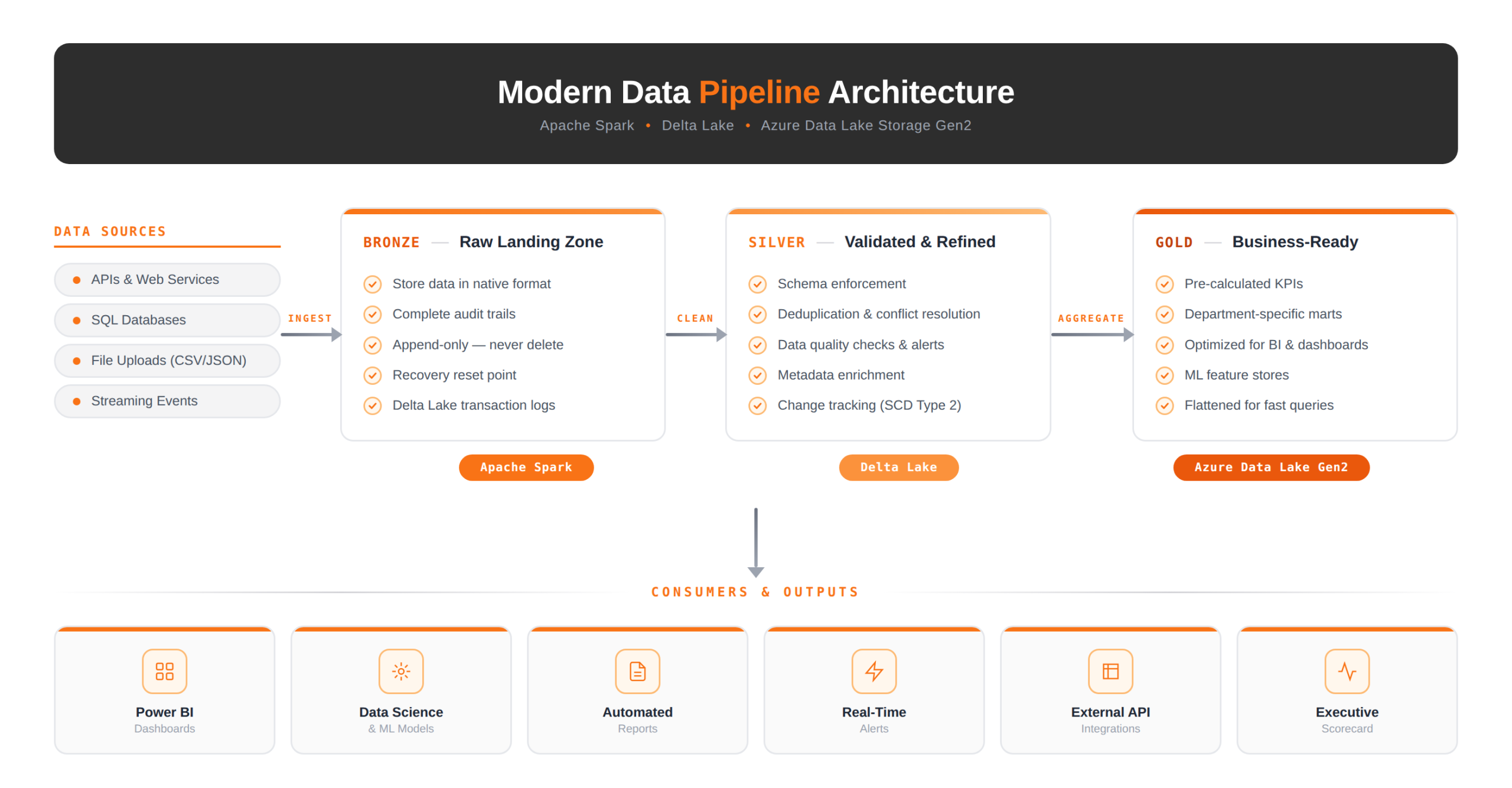
We implemented a medallion architecture – Bronze, Silver, Gold – not because it’s fashionable, but because it directly addressed the client’s recovery and trust problems. Here’s the architecture we deployed:
Bronze: The Safety Net We Wish We’d Always Had
By design, the Bronze layer stores every incoming record exactly as it arrives – whether API responses, database CDC events, or flat file uploads – with no transformations applied. While we do append ingestion timestamps and source metadata for traceability, the underlying payload itself remains entirely untouched. As a result, this layer serves as an immutable, auditable record of truth that downstream processes can always fall back to if reprocessing or debugging becomes necessary.
This design choice proved its value in week
This principle proved its value just three weeks into production. Unexpectedly, a business rule change in the Silver layer produced incorrect compliance calculations for a subset of records. Fortunately, however, because Bronze held the original data with full lineage, we were able to reprocess the affected partition in just 20 minutes. Without this safeguard, the alternative would have been requesting a complete re-extract from the source ERP system – a process that would have taken two days and additionally required coordinating with a third-party vendor. In short, the Bronze layer’s immutability turned what could have been a multi-day recovery effort into a routine 20-minute fix.
Silver: Where Trust Gets Built
Fundamentally, the Silver layer is where raw data becomes reliable data. With this goal in mind, our team implemented over 40 automated validation rules at this stage – including schema enforcement, null checks on required fields, referential integrity against master data tables, as well as duplicate detection using composite keys across shipment and order records. Together, these rules formed a comprehensive trust boundary between ingestion and downstream consumption.
Notably, one rule alone – flagging orders where the ship-to address didn’t match any registered facility in the compliance database – caught 340 anomalies in the first month. Previously, these discrepancies would only surface as exceptions during the month-end close, consequently requiring hours of manual research to resolve. Now, however, they trigger alerts within an hour of ingestion, effectively transforming a reactive bottleneck into a proactive detection mechanism.
We also implemented Slowly Changing Dimension Type 2 tracking at this layer, giving the finance team the ability to query historical states of customer and facility records – a capability they’d been requesting for two years.
Gold: Purpose-Built for Each Team
Instead of creating a single monolithic reporting table, we intentionally built department-specific data marts in the Gold layer. For instance, Operations received pre-aggregated inventory positions broken down by warehouse and product category. Meanwhile, Finance was provided with revenue recognition tables carefully aligned to their reporting calendar. Likewise, Compliance got regulatory-ready audit trails with complete lineage tracing back to Bronze. In this way, each department consumed data in a shape that matched their exact workflow – rather than forcing teams to transform a shared, one-size-fits-all table on their own.
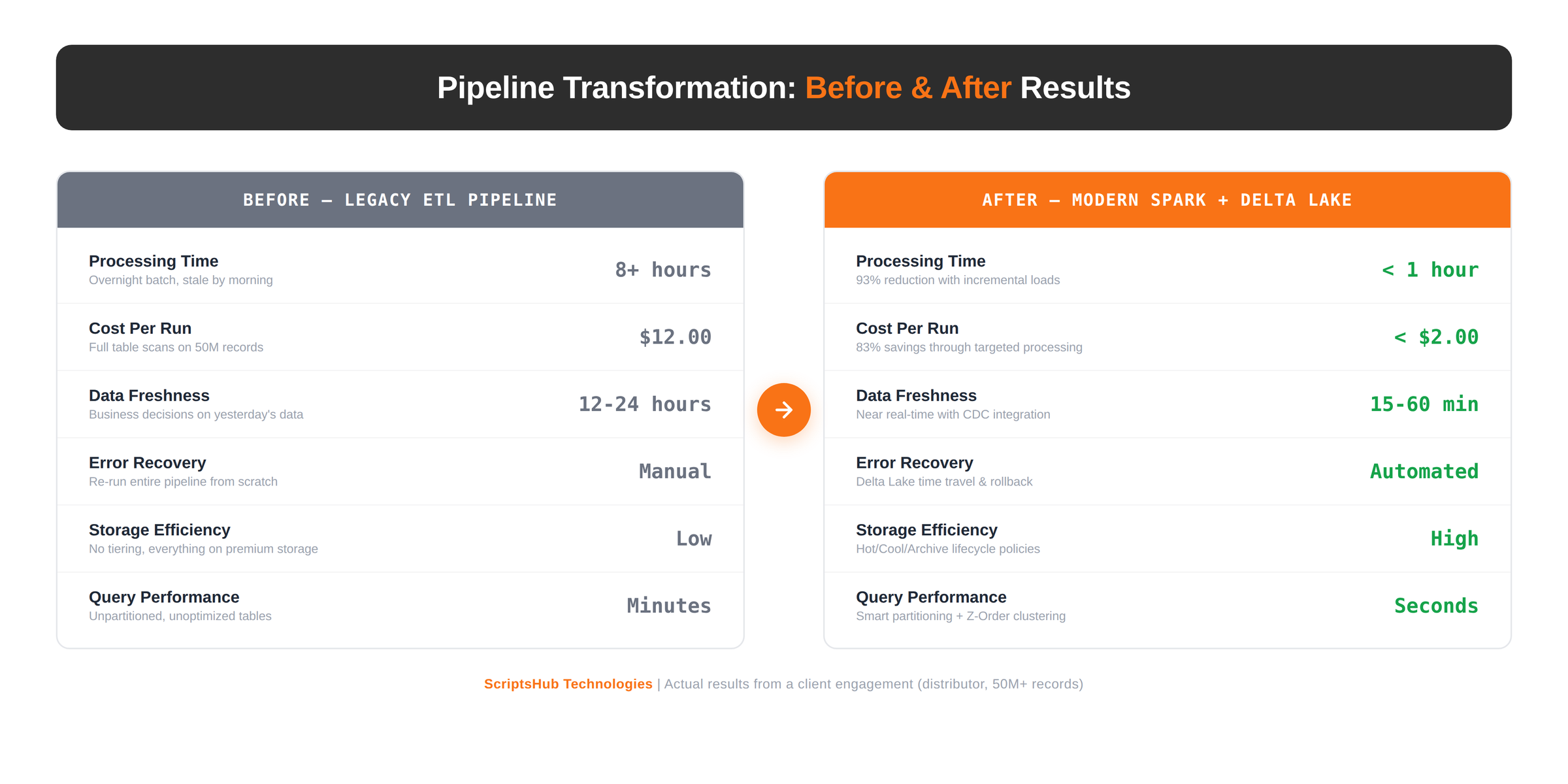
This approach reduced Power BI dashboard load times from 45 seconds to under 3 seconds – not through BI tuning, but by giving dashboards data that was already shaped for their specific visualizations.
The Breakthrough: Processing Only What Changed
The single biggest performance gain came from eliminating full-table scans. The legacy pipeline reprocessed all 50 million records every night regardless of how many actually changed. On an average day, fewer than 200,000 records were new or modified – less than 0.4% of the total.
We implemented three incremental loading strategies, each suited to different source characteristics.
Watermark-based processing worked for sources with reliable modified-date columns. We maintain a control table that stores the high-water mark from each successful run. The next execution queries only records modified after that timestamp. For the core transaction tables, this reduced per-run processing from 50 million records to roughly 180,000 – a 99.6% reduction in data scanned.
Change Data Capture (CDC) from SQL Server provided a stream of inserts, updates, and deletes for the ERP tables. We consume these via Azure Event Hubs and apply them using Delta Lake’s MERGE operation. This brought data freshness for order and inventory data from 12 hours to approximately 15 minutes.
Delta Lake version comparison handles sources without timestamp columns – primarily reference data files uploaded by third parties. We compare the current and previous table versions using Delta’s time travel feature, extract the diff, and process only changes. It’s a technique that’s underutilized in the industry and solved a problem we’d struggled with on previous engagements.
Cost Discipline: How We Hit 40% Savings
The first month on Azure, the client’s bill came in at nearly double the projected budget. This is more common than most vendors will admit, and it’s why cost optimization is an engineering discipline, not an afterthought.
We attacked costs across three dimensions.
Storage tiering delivered the largest single savings. We configured ADLS Gen2 lifecycle policies to automatically move data between Hot, Cool, and Archive tiers based on age. Current-quarter data stays on Hot tier for instant access. Previous-year data moves to Cool. Anything beyond two years goes to Archive. This policy alone reduced storage costs by 60%.
Compute right-sizing was the second lever. The initial deployment used fixed-size clusters running 24/7. We replaced these with autoscaling policies that expand during the morning processing window and contract to minimum during off-hours. Development and testing clusters auto-terminate after 30 minutes of inactivity. These changes cut compute spend roughly in half.
File management discipline addressed a subtle but expensive problem. Streaming ingestion was creating thousands of small files per hour – each requiring separate I/O operations during queries. We scheduled daily OPTIMIZE operations on active partitions, consolidating small files into optimally-sized ones. Combined with Z-Order clustering on frequently-filtered columns (customer ID and transaction date), this improved query performance by 30% while reducing the I/O costs associated with reading fragmented data.
What We’d Do Differently: Honest Lessons
No engagement is perfect, and we’d be doing a disservice to pretend otherwise. Three lessons stood out.
We should have involved business users earlier in partition design. Initially, our partitioning scheme for the Gold layer was optimized to support the most common queries at that time. However, within just a few weeks, the analytics team began running queries with different filter patterns that inevitably crossed partition boundaries. As a result, we had to re-partition two Gold tables – a disruptive and costly change that ultimately would have been entirely avoidable if we had proactively mapped out both planned and current query patterns during the discovery phase.
Monitoring should be built from day one, not bolted on. We deployed pipelines first and added comprehensive monitoring in sprint three. During that gap, a silent schema change in a source API went undetected for 48 hours. Now, every new engagement begins with monitoring infrastructure alongside the first pipeline.
Documentation debt compounds fast. With nine data marts across three departments, keeping lineage documentation current required more discipline than we initially allocated. We’ve since adopted automated data lineage tools that generate documentation from the pipeline code itself – a practice we now consider mandatory.
Is Your Pipeline Holding Your Business Back?
At ScriptsHub Technologies, we’ve delivered this type of data infrastructure modernization across pharmaceutical distribution, healthcare, and financial services. Each engagement is different – the technology choices, partition strategies, and cost models are tailored to the specific operational reality of each client.
If your team is spending more time managing pipelines than analyzing data, or if your business users are making decisions on stale information, we should talk. We offer a complimentary Pipeline Health Assessment – a structured diagnostic that maps your current architecture, identifies bottlenecks, and provides a prioritized modernization roadmap.
→ Request your Pipeline Health Assessment: connect with us at info@scriptshub.com or visit scriptshub-cms.azurewebsites.net/
Frequently Asked Question’s
1. What is medallion architecture and why use it for data pipelines?
Medallion architecture organizes data into Bronze (raw), Silver (validated), and Gold (business-ready) layers using Delta Lake. It progressively improves data quality, enables pipeline recovery from any layer, and builds trust through incremental refinement.
2. How does incremental loading reduce ETL processing time?
Incremental loading processes only new or modified records instead of full-table scans. Using watermark-based queries, Change Data Capture, or Delta Lake version comparison, organizations typically reduce data scanned by over 99% per pipeline run.
3. Why do legacy ETL Pipelines fail at scale?
Legacy ETL pipelines fail because they reprocess entire datasets regardless of changes, lack ACID transaction support, cannot recover from partial failures gracefully, and produce stale data that forces business teams into reactive decision-making.
4. How does Delta Lake improve data pipeline reliability?
Delta Lake adds ACID transactions, schema enforcement, and time travel to data lakes. This prevents partial writes from corrupting tables, enables rollback to previous data versions, and supports both batch and streaming workloads in a single storage layer.
5. How do you optimize Azure Databricks costs for data pipelines?
Key cost levers include storage tiering across hot, cool, and archive tiers, autoscaling clusters that contract during off-hours, auto-terminating idle development clusters, and regular file compaction using OPTIMIZE with Z-Order clustering on filtered columns.
6. What is training-serving skew in data pipelines and how do you prevent it?
Training-serving skew occurs when feature computation differs between batch and real-time environments. A unified feature pipeline – one codebase shared across training and serving – eliminates inconsistencies in missing value handling, encoding, and transformations.
7. How do you monitor data pipeline health beyond infrastructure metrics?
Effective pipeline monitoring tracks data quality metrics – schema drift, row count anomalies, freshness SLAs, and business outcome correlation – not just CPU and memory. Silent schema changes and distribution shifts go undetected by infrastructure monitoring alone.
Leave a Reply